
Design a KDP Cover with Automatic Spine Width
Click the big cover card to open the Cover Editor — a full canvas editor working on the real printable cover layout: back cover, spine, and front cover in one spread, with the spine width already computed from your page count.
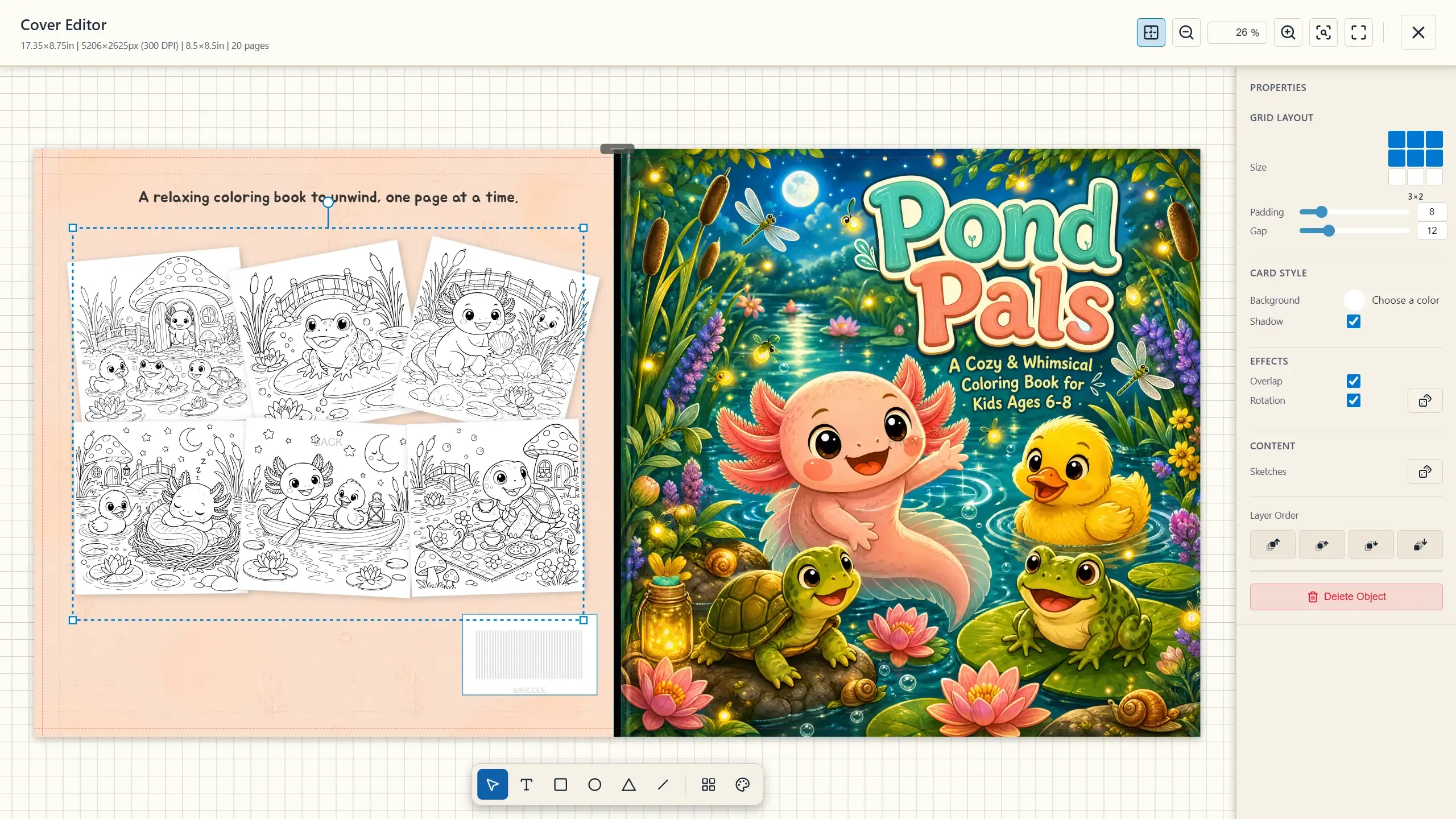
The Toolbox
Section titled “The Toolbox”| Tool | What it does |
|---|---|
| Select (V) | Move, resize, rotate any object. |
| Text (T) | Title, subtitle, author name — with font, size, bold/italic, alignment, and three sizing modes (fixed / fit box to text / shrink text to box). |
| Rectangle / Ellipse / Triangle / Line | Shapes with fill, stroke (solid/dashed/dotted), opacity, rotation, and layer ordering. |
| Page Preview Layout (P) | The classic coloring-book back cover: a grid of your actual pages (1–3 × 1–3), with card shadows, overlap, and random-rotation options — the “look inside” collage in two clicks. |
| Art from Project (A) | Place any of your colored pages or sketches on the cover, with flip and mask editing. |
| Guides (G), Zoom (F / R) | Safe-area guides and view controls. |
Let AI Do the Design
Section titled “Let AI Do the Design”Select a cover section (front, back, or spine) and the properties panel offers AI generation, in two scopes:
- Generate Background — a backdrop image for that section, optionally guided by a prompt (there’s even a Suggest prompt button).
- Design Full Front Cover — describe the cover you want and the AI composes the entire front: hero illustration, composition, the works. Supports
#character mentions, and a special{art_objs}token that tells the AI to incorporate the art pieces you’ve already placed on the canvas.
Both are credit-spending actions (marked with the wand icon). You can regenerate freely and keep editing on top — AI output lands as editable objects, not a flattened image.
Exporting the Cover
Section titled “Exporting the Cover”Close the editor (your design saves automatically) and press Export Cover. The PDF is produced as a single full-wrap file at exact KDP cover dimensions — back cover + spine + front cover, with the spine width computed from your final interior page count using KDP’s per-page spine factor (a number you should never have to round by hand), and the barcode clearance zone kept clear on the back. Wrong full-wrap dimensions and miscalculated spine width are the two most common reasons KDP rejects covers; here they’re derived, not typed. This is why matter and page selection come first: they fix the page count the spine depends on.
If you open the editor before the matter exists, “Book Details Not Complete” warns you that the spine can’t be final yet — Continue Anyway works, just re-check before export.