
AutoMate: Build a Whole Book Hands-Free
Once you’ve been through the workflow manually, AutoMate is the shortcut for every book after that: Brushey the AutoMate, an in-app agent that drives the same stages you would — Sketch, Coloring, Book, Assets, Videos — clicking the same buttons, respecting the same rules.
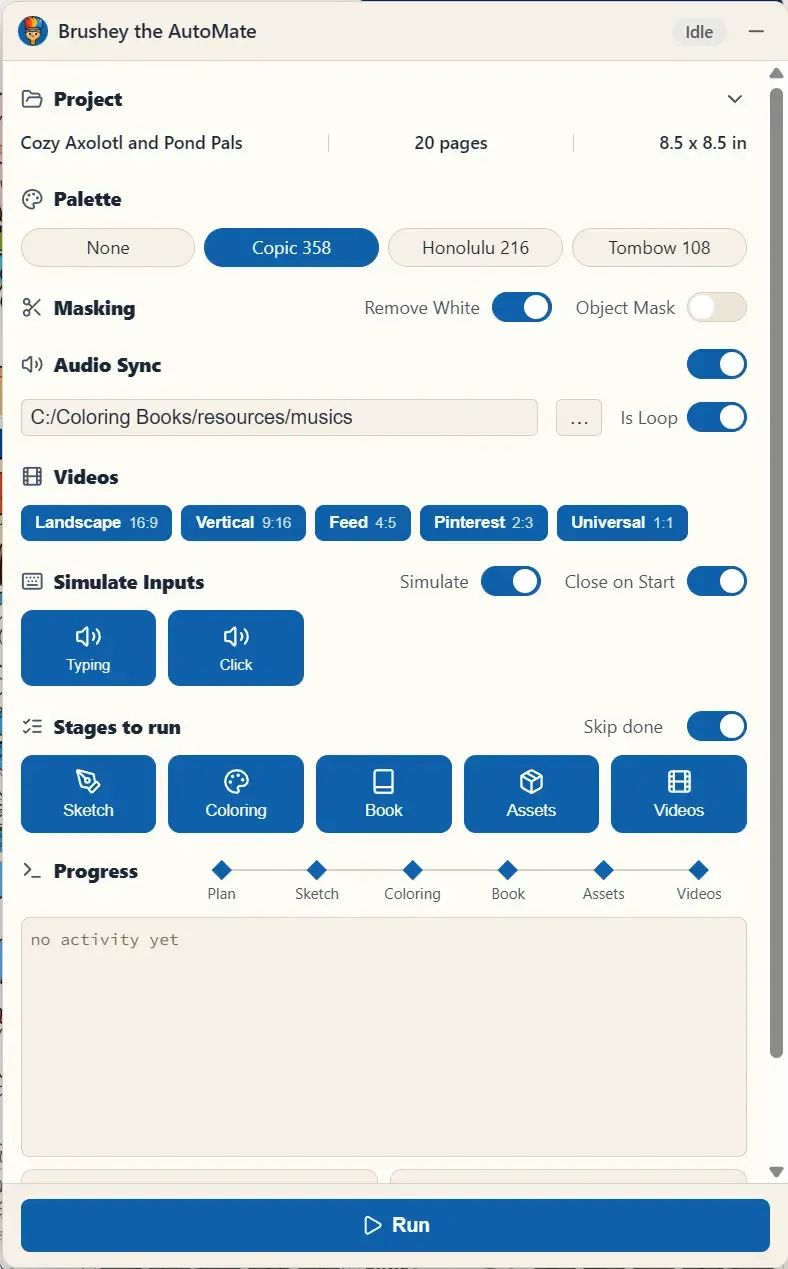
The Dashboard, Top to Bottom
Section titled “The Dashboard, Top to Bottom”- Project — the brief, assembled from your open project (name, page count, trim size).
- Palette — the marker palette the Coloring stage will use (None, Copic 358, Honolulu 216, Tombow 108).
- Masking — the Assets-stage toggles (Remove White, Object Mask).
- Audio Sync — point it at a music folder (with Is Loop) and the videos come out synced, same as in the Videos stage.
- Simulate Inputs — off by default: Brushey works headless, never touches your mouse or keyboard, and keeps going while you use other apps or leave CBE minimized. Turn Simulate on only for a demo or a recording: Brushey then moves the real cursor and types like a person (with optional Typing/Click sounds), which takes over your mouse and keyboard and needs the CBE window in front for the whole run. The switch resets to off every time you start the app. Close on Start collapses the dashboard once the run begins.
- Stages to run — pick any subset of Sketch / Coloring / Book / Assets / Videos. With Skip done on, stages and pages that are already complete are detected and skipped — never redone.
- Progress — a stepper across the pipeline plus a live log of exactly what Brushey is doing. Run starts it; the same button stops and resumes.
When the run finishes, the output notes tell you what matters: book_cover.pdf and book_paperback.pdf are the files you submit to KDP, and the MP4s are your full timelapse videos.
Credit Safety
Section titled “Credit Safety”With Skip done enabled, AutoMate resumes unfinished work. For MCP, skip_completed=true preserves valid completed outputs; missing or corrupt outputs can be regenerated. Regeneration and in-flight API requests can cost credits, so resuming does not guarantee zero additional cost.
When to Use It
Section titled “When to Use It”- Overnight batch — plan two or three books in the evening, run AutoMate, review finished drafts in the morning.
- Restarting stalled projects — point it at a half-finished book with Skip done on, and it completes only what’s missing.
AI agents and MCP automation
Section titled “AI agents and MCP automation”Connect an external agent, check readiness, and run or recover the pipeline: AI Agents & MCP Automation.